Information retrieval & natural-language search
Natural-language file search, and why the folder lost
A dose of good intentions, growth, great ideas, a little more growth, and a few more staff. And before long, higgledy-piggledy folders, files on their own, like sheep that wandered off into their own field. Perhaps they are pictures of sheep. Wooooaahh. Ordered things tend to become disordered things. It is the nature of life and the universe. You can tidy, you can clean, but even with a great system and all those good intentions, things go awry. A studio’s cloud storage is no different to a room in your home. Or your shed — keeper of the chaos and a nice view of the roses.
When we built Spaces, we did it in full knowledge of the facts of life. So rather than fight the disorder, we built a tool to sit above it. It’s called, not originally, natural-language search. You type what you actually remember — not a filename, not a folder path, but the thing itself, in the words you would use out loud — and the search goes trotting off (quite fast) looking across everything the studio holds: the documents and their contents, the spreadsheets, the photographs and what is in them, the video and the shoots it belongs to, and the quiet cargo of metadata that files carry and rarely surrender. Yes, that might mean some office party pics, too.
Our fancy search was an architectural decision at the outset, because a search that leans on this kind of understanding is the only sort that keeps working as your studio grows from a few hundred files to a few million. And all of the embarrassing party pics to come. Sorry.
The savings are your sanity, time, and all that stress that bad tech brings, but never discloses when you sign up. Like the shed, it’s all roses at that point. In practice that means finding the things you would otherwise lose an afternoon to, like a PDF that mentions the agreed day rate, somewhere inside a contract whose filename you have long forgotten; a spreadsheet with the third-quarter figures; an invoice from your coffee supplier whose name you can almost picture — each found by what is written inside it rather than by whether anyone thought to label the folder correctly, because the search reads the contents and not merely the cover.
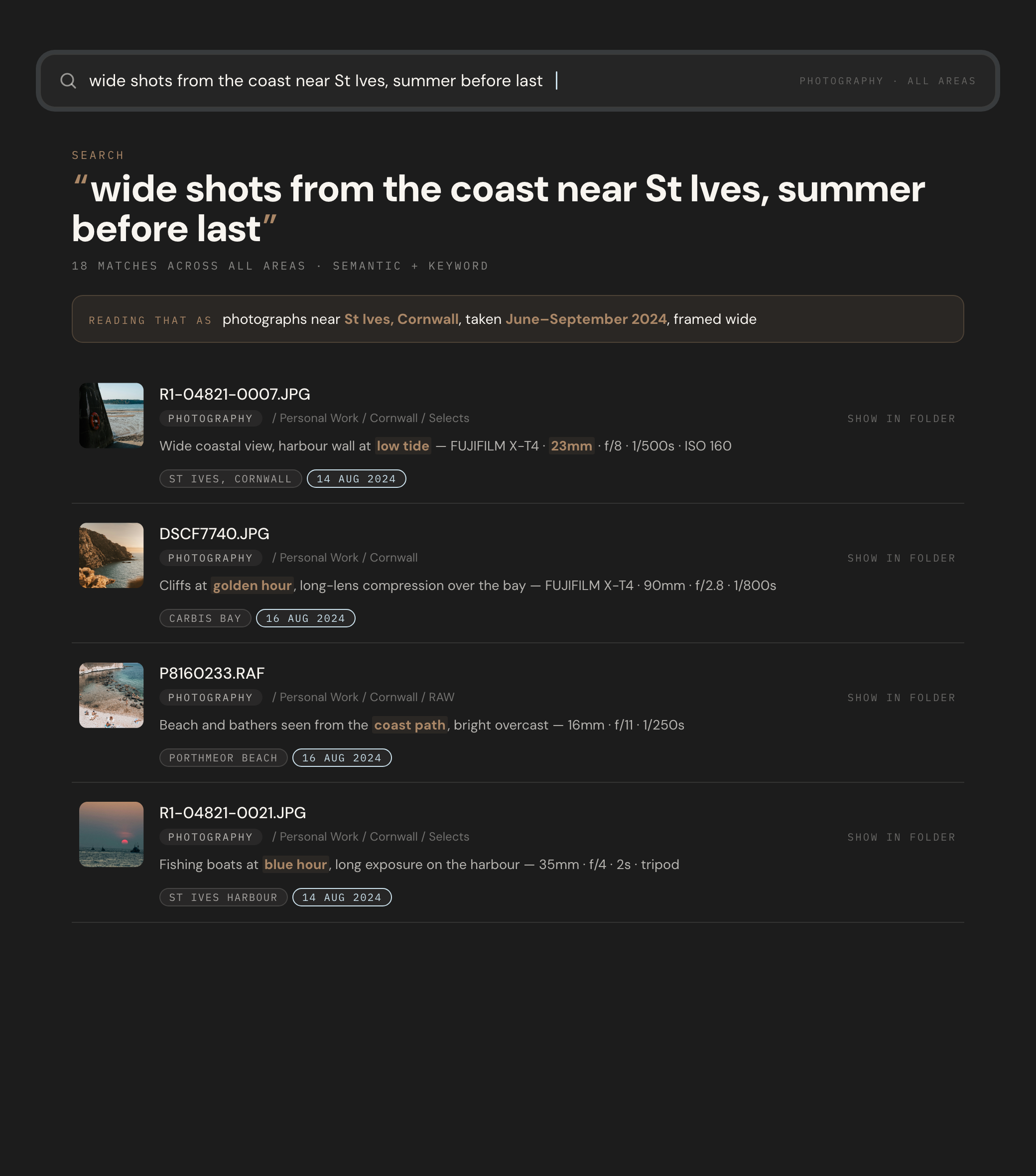
It is with photographs, though, that the difference becomes something close to a pleasure. Every frame a camera makes carries a small cargo of fact — when it was taken, with which lens and at what settings, and, more often than not, exactly where in the world the shutter fell (and you fell over — that was a tricky coastal path, and no one expected a goat) — and Spaces reads all of it. So you can search the way a photographer actually thinks: wide shots from the coast near St Ives, frames from the summer before last, portraits of the office dogs at golden hour on the long lens (less biting that way). We turn the coordinates buried in a photograph into something you can simply ask about, so that a place and a season — a patch of map and a span of weeks — become an ordinary thing to search for, and the handful of images that fall inside both rise quietly to the top.
None of this shows up in a feature grid or a price-per-terabyte table; it was never going to, and we built it anyway. There are cheaper places to put your files, and we would never pretend otherwise; what we are trying to build is the part that comes after you have put them somewhere — the quiet, daily, almost miraculous business of getting them back — because a studio’s work is only ever as valuable as its ability to lay hands on it again. Making miracles? What a task. And what ego! Still, a search that meets you where your memory already is turns out to be worth a good deal more than another empty folder.